

Fields registry (Workspace setup → Fields)
The registry defines your contact fields, their labels, types and list options. These fields become table columns, contact-page fields, form questions, automation conditions and message variables. Every field is available in the variable picker under its label, with the[token] beside it.
Standalone workspaces show Contact fields first and Voice agent variables in a separate table beneath it. Both tables appear on the same page at every screen size. Contact fields belong to your workspace, including fields that agents save answers into. Voice agent variables belong to the agents that declare them. Their list choices and removal are managed on the agent’s page; you can change their display labels here. Archived agents’ variables do not appear. HubSpot workspaces also keep their voice variables in a separate table.
Each collapsed row shows Name, Type, and stacked name pills for Automations that read or write the field and, in standalone workspaces, Agents that declare it. Empty usage stays blank. List types show List; expand the row to see the choices. Click the row background, name or chevron to expand its settings.
Click an agent or automation pill to filter both tables to fields used by it; click it again to remove that selection. The filters on the Agents and Automations column headers let you select several names. Matches include any selected agent and any selected automation, together with your search. Each card header shows how many fields remain, with Clear beside the count to remove the agent and automation filters. On a phone, the same filters appear in the card header above the folded rows.
Agent and automation names in an expanded row link to their editors. Use Back
in the editor to return to Workspace setup with your search, filters and expanded
field restored. The pills in collapsed rows continue to filter the tables.
Expanded rows hold the editable name, visibility setting and variable token with a copy button. HubSpot fields also have message-value mappings for formatting imported options in messages. Standalone lists use their options directly, without a second “prints as” setting. List options appear vertically, one per line, with Add underneath. For your own standalone list fields, add or remove List options here. Changes save automatically. Remove field is inside the expanded row for custom fields; confirming removal lists the automations that depend on it. Core fields and agent-owned variables cannot be removed here.
Drag the dots at the far left to rearrange fields within their table. The dots appear when you hover over a row or focus it with the keyboard and remain visible on touch devices. With the handle focused, use the up and down arrow keys to move the field.
Keep an empty field visible
Expand a field and turn on Always show to keep it on the contact page even when its value is empty. Other empty fields stay behind Show empty fields. First name, Last name and Email start enabled; Phone, Status and Owner are always visible. This controls the contact page, independently of your Contacts table columns or whether a form requires the field.Who fills a field (standalone)
In a standalone workspace a field is written by people unless a voice agent saves its answer there. That is decided on each agent’s page, in the Contact field column of its variables: a green check means this agent’s answer is saved on the field, and clicking the mark turns it on or off for that agent. It is not set here. See what the agent collects. The permission is a guard, not a note to yourself. A call that goes to voicemail still produces a full analysis, filled with the agent’s best guesses, so a field no agent saves to stays untouchable no matter what came back from the call. Core fields (name, email) are always saved; the phone number never is.Deals
Turn on Show the Deals tab to use the pipeline. Pipeline stages appear as stacked pills: click a name to edit, drag its dots to rearrange, or focus the dots and use the up/down arrow keys. The remove control appears on hover or keyboard focus and remains visible on touch devices. Removing a stage moves its open deals to the first column. New, Won and Lost are built-in board columns. New column label, Won column label and Lost column label let you use your own wording for those columns. Changes save on leaving the field or pressing Enter and appear on the board, contact stage choices, closing controls and overview. Clear a label to restore the default in each user’s language. These names change the display only; choosing the successful or unsuccessful outcome still closes the deal in the same way. Contact Status names are set separately below. In a standalone workspace, the two settings below the stages choose one contact Status each: Has an open or won deal → Status defaults to Deal, and All deals lost → Status defaults to Lost. Choose an existing value or type a new name. The values must differ. They also appear in the Status field’s list, with an information marker; change them here rather than removing them from that list. Values you stop using here become ordinary list options. Changing these settings updates existing deal contacts without starting outreach; update any automation conditions that should use the new names. HubSpot workspaces keep A contact becomes a deal when Status is, which can contain several entry values. Entering one creates an open deal if none exists; changing a deal’s outcome leaves the HubSpot contact Status independent. Show deals by picks what each board card leads with: Company or Contact. With Company, the contact person appears under it. Until you choose, workspaces that track companies show the company. Closed deals stay on the board controls how long Won/Lost cards remain visible, without deleting them. Currency offers a searchable dropdown of 20 common currencies, including Turkish lira (TRY). The Deals dropdowns share one compact width that adapts to smaller screens. Each choice shows its name, code and symbol. Search by name or code; your selection saves automatically. Existing custom currency values stay visible until you replace them. Choose None to hide the currency prefix. Changing currency changes the display only; it does not convert existing amounts. See Deals and contact Status for how individual outcomes affect a contact.Companies
The Companies setting has its own tab, Workspace setup → Companies. Choose your existing Company or Business name text field. A standalone workspace can create the standard Company field if it is missing. Show company beside contact names and, in standalone workspaces, Fill company from email domain appear above the Company field picker. The display switch adds company names in Inbox and Contacts; turning it off keeps the Company field on contact records. Turn on Show company beside contact names to include companies in Inbox and Contacts. To keep the Company field visible when empty, enable Always show in its Contact fields settings. A named contact appears as Person · Company. Without a person’s name, you see Company · mailbox, so shared addresses from the same business remain distinguishable. These preferences apply to your workspace; company display starts off. In a standalone workspace, turn on Fill company from email domain to fill missing companies for new contacts and email changes. It uses a known domain match or a company name published by the business’s own website. Personal email providers and common sending services are skipped. Under Excluded domains, choose Add domain, type a domain and press Enter to add a pill. You can also paste several domains separated by commas or spaces. Remove a pill with its ×, which appears on hover or focus. Changes save automatically; subdomains are skipped too. Companies fields use the same compact width as the Deals dropdowns. The domain and company-name inputs wrap onto separate lines when space is limited; Add match stays beside the company-name input. Under Known domain match, enter a business email domain and its company name, then choose Add match. Reusing the domain corrects its match for future lookups. Company values already on contacts stay as they are. Automatic filling applies to new contacts and email changes. It preserves existing values, manual corrections and manual clears, and does not start outreach. If the website cannot provide a company name, the field stays empty for you to fill. Automatic filling starts off.SLAs
Workspace setup → SLAs sets how fast your team should answer a reply. It colors the Waiting column on your saved views in Contacts: green is on track, yellow is at risk, red is breached. The All tab shows no colors, because a service level is for the lists your team works, not for every contact. The clock is Reply waiting: it counts from a contact’s first reply in their current Possibility until someone changes it. Each row is a rule: the Possibility values it covers, At risk after and Breached after. A contact is on track until the first limit, at risk from it, and breached from the second. Limits take minutes, hours or days, and they count calendar time, so nights and weekends count too. The All statuses rule covers every Possibility, and a rule for a specific value beats it. A value can have only one rule, so every contact answers to exactly one. Add rule offers All statuses while there is none, then each value no rule covers yet; a new rule starts with the All statuses limits. One rule can cover several values: open its value list and tick more. Remove a rule with its ×. With no rules, nothing is colored. For example: replies at risk after 4 hours and breached after 24 for all statuses; no Possibility yet at risk after 1 hour and breached after 4; Interested at risk after 3 days and breached after 7. A workspace starts with one rule: replies at risk after 4 hours and breached after a day, for all statuses. Changes save automatically.Contact owners
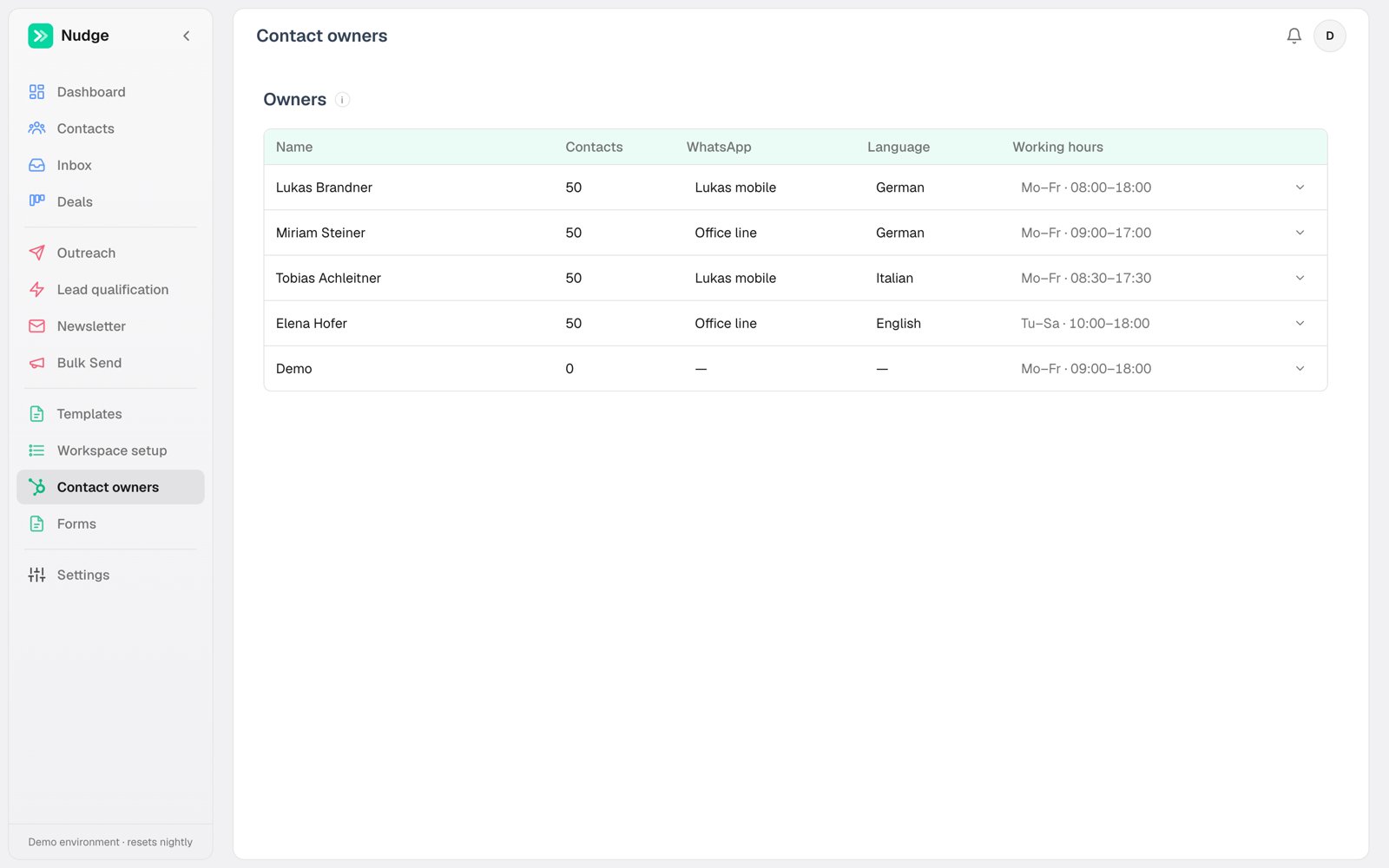
Owners are your reps, the people leads are assigned to. Per owner you set:- Working hours, which gate automated WhatsApp sends for their contacts. They do not decide when calls ring: a call rings in its voice agent’s calling hours. Meetings are booked inside them too, narrowed by each meeting type’s own days and times (see Meetings).
- WhatsApp number, the personal line their messages send from
- Default calling agent, so calls to their leads use the right voice and number
Numbers and agents
Each channel owns its accounts, under Channels. WhatsApp holds your phone numbers with their connection type (personal or Cloud API), the assistant that answers on each, and the quick-chat opener. Voice agents holds your AI calling agents: voice, script, calling hours and pinned outbound number. Email holds sending addresses and signatures. Members read these pages exactly as admins see them, with the controls removed. The pacing controls for personal numbers described in WhatsApp sit in Settings → General, in the Personal numbers card.General (Settings → General)
Branding sets how the workspace presents itself. Workspace name identifies the workspace in browser-tab titles. The navigation shows just the logo; hover it to see the name. Logo is an image you upload, shown in the sidebar, on the sign-in screen and as the browser-tab icon; PNG or SVG with a transparent background looks best. Leave either one unset and Nudge’s own name or blue-gradient N logo shows instead. Terms page and Privacy policy page are the addresses of your own legal pages: your public booking pages and forms then say, above the Confirm or Submit button, that going ahead means agreeing to them, with links. Leave them empty and no such line shows. Inbox decides what brings a conversation to the top of the Inbox: WhatsApp replies, Email replies, Inbound calls (all on to start with) and Messages and calls we send (off). Changing a switch re-sorts the conversations already in the Inbox, which takes about a minute; the card says Updating the Inbox… until it’s done. Personal numbers holds the sending limits for QR-paired WhatsApp numbers: Send manual messages instantly, Min gap between sends (sec), Randomize up to (sec), Max per hour and Max per day. Every limit applies per number, so with several numbers the sends go out side by side and each number keeps its own pace. Cloud API numbers are exempt, because Meta paces that lane itself. What each limit does is explained under Personal numbers.Connections (Settings → Connections)
Credentials have a tab of their own: the HubSpot token, the AI and voice keys and defaults, the WhatsApp Cloud API token and, on HubSpot workspaces, the lead pull settings. See Connections.Alerts
Sync failures reach admins as a notification: bell by default, email if you turn it on. It is one row in the notifications table like any other event, and every user picks their own, per event and per channel. See Users and roles. The theme (light, dark, or automatic by local sunrise and sunset) is a personal choice, in the menu that opens from your name in the sidebar.API keys
Settings → API mints keys for the REST API and shows the last 100 API requests with their status and errors.Nudge autosaves everywhere. If you are looking for a Save button, the change is already saved; watch for the brief “Saved” indicator.