

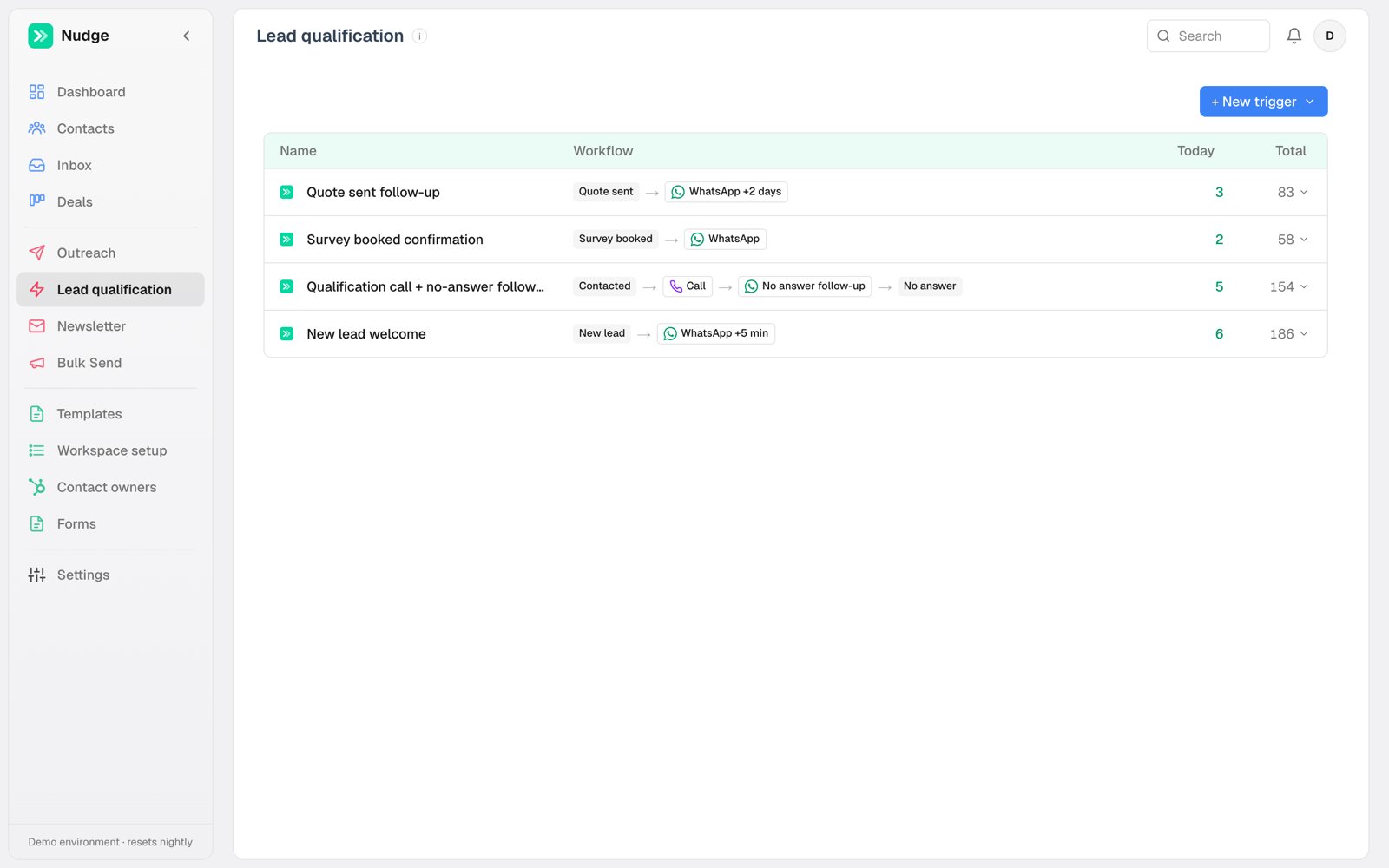
What starts an automation
Different things can start an automation, and you pick which when you create it:- Lead state, the default. The contact’s fields changed and now match your conditions. This is the classic “possibility became Quote sent” rule.
- Call outcome. An AI call finished. The automation can read whether it was answered, which agent ran it, and what the call collected, so “no answer, try WhatsApp tomorrow” is one rule. With meetings on, it can also ask whether a meeting was booked on this call.
- Reply. A contact wrote back on WhatsApp. Scope it to selected templates and match a button click or exact typed reply.
- Meeting. A meeting was booked, moved or cancelled, by anyone. Narrow it with the meeting type and who booked it (a voice agent, the contact, or a person in Nudge). A booking a voice agent makes on a call runs these automations once the call has ended. Shown when meetings are on for your workspace.
Inside an automation
Open an automation to see Setup and Activity in the same control row as Save changes. Setup contains the conditions and actions. Activity shows which contacts the automation ran for and what happened, newest first: sends, call results, field changes and notes. Activity stays available on saved automations; an empty history shows No activity yet. Expand an event to read its details or open a contact from its name. This view shows up to 25 recent events. Each time the automation runs for a contact is one row: Contact, Event, Details and When. Event says why it ran:- Matched: the contact met a lead-state automation’s conditions. Details say how many messages it queued.
- Call answered or Call missed: the call that a call-outcome automation reacted to.
- Button clicked or Reply: what the contact sent on WhatsApp, and the message they sent it on, for example
“Talebi Kapatın” on ES - N/A 1.
Anatomy of an automation
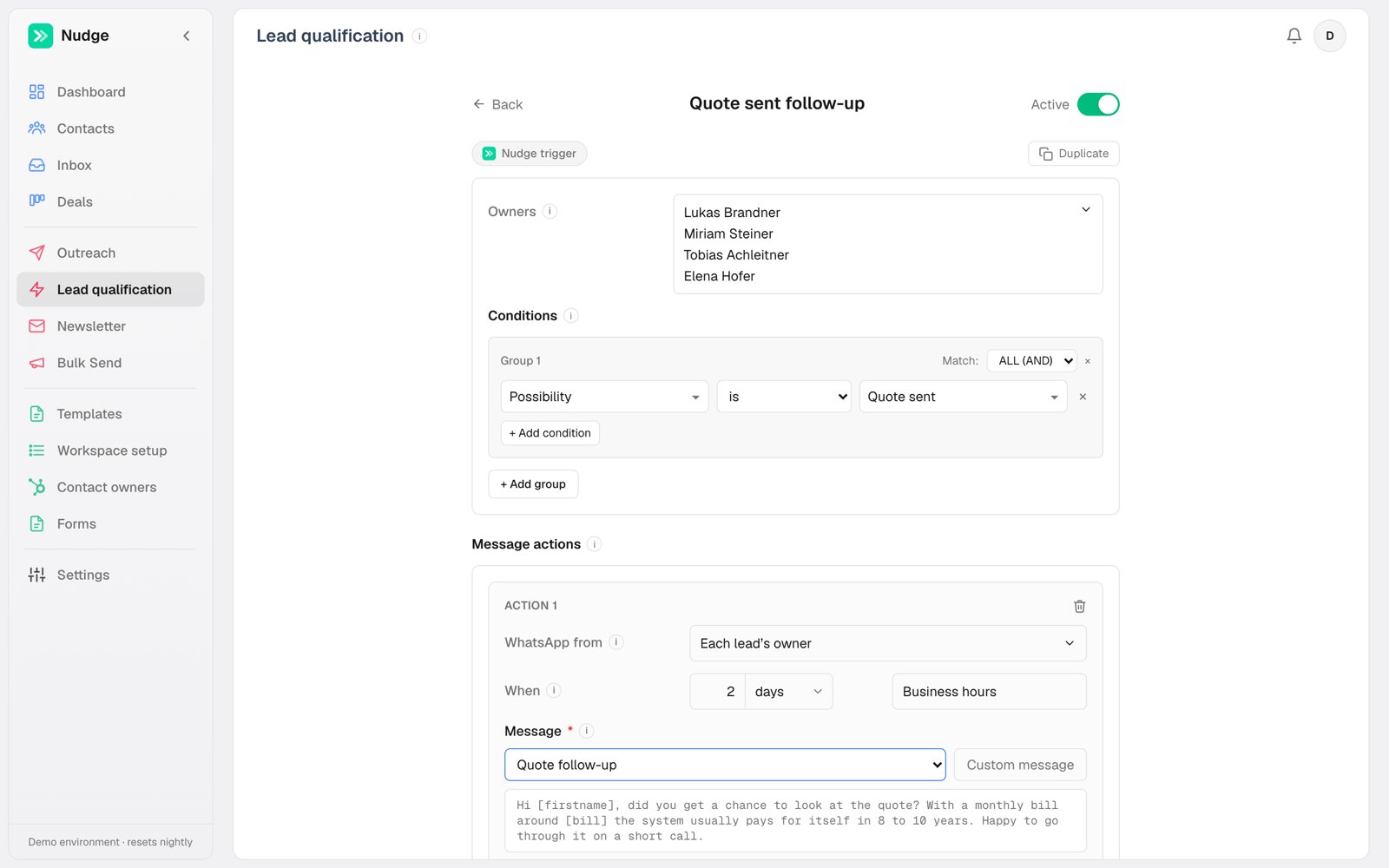
- Owners: which reps’ contacts this automation covers. An automation can serve the whole team or one rep.
- Conditions: field-based rules, grouped with AND/OR. “Possibility is Quote sent” is the classic, but any registry field works: postcode starts with 6, budget above X, homeowner is Yes. Phone country is available too — see Filtering by the phone’s country. A contains condition takes several texts. Type one and press Enter, and it goes on its own line; the contact matches if their field contains any of them. “Recent conversion contains Fuar İletişim Formu or Okul Fuarı” is one condition, and you can pair it with “course type is Master” in the same group set to ALL. Don’t separate texts with a comma: the comma becomes part of the text and nothing will match.
- Message actions: one or more sends, each with its own channel (WhatsApp, email or call), delay, and send window. A single automation can call immediately AND queue a WhatsApp for two days later.
- CRM writes: what to set when the automation runs, when its last message has been sent, or when a call ends. This is how chains form: the call action’s “on failure set possibility to No answer” is what starts the no-answer follow-up automation.
- Notes: an automation can also write a note on the contact, explaining in plain words what it did and why. See Notes an automation writes.
Send windows
Each WhatsApp action picks when it is allowed to fire: In business hours holds until the owner’s working hours, Anytime sends immediately, Off-hours only deliberately waits for the evening. Calls always clamp to the calling agent’s hours; emails send any time.How delays count
An automation’s actions run as steps, in order of their delay. Each delay counts from the step before it, not from the moment the automation ran, so the gaps you set between steps hold.- Days are working days for a step that waits for business hours. “After 3 days” from a Friday is Wednesday, at the same time of day. If that time is outside the working hours, the step goes when that day opens.
- A step that has to wait takes the next ones with it. Three WhatsApps (now, after 1 day, after 2 days) fired on a Saturday go out Saturday, Monday and Tuesday, one a day.
- Hours and minutes count the clock. “After 2 hours” is two hours, then it waits for working hours if it lands outside them.
- Anytime steps and emails count calendar days.
- Calls count the calling agent’s working days. WhatsApp counts the contact owner’s.
Delayed messages are re-checked before they go out
A message queued for tomorrow is not sent blindly tomorrow. Just before it goes out, Nudge checks the automation’s conditions again against the contact’s record and cancels the message instead of sending it if they no longer match. This is automatic and always on — it is what stops a three-day drip from messaging someone who was reached on day one. Sometimes the rule that lets a contact in is not the rule that should keep the send alive. Re-check before sending lets you write a separate, narrower check for that moment. The case it exists for: a callback automation starts on “the caller gave a call-back time on this call”. Two hours later the question is different: is the call still wanted? With Re-check before sending set to “call-back time is still on the record, and the status is not Cancelled, Not Interested or Blacklisted”, a person can stop the call by clearing the time or closing the contact, and a person moving the contact to Interested does not cancel a call the contact asked for. Turn it on and it starts as a copy of your conditions, which you then cut down. Turn it off and you are back to re-checking the conditions themselves.Seeing what is queued
Activity → Queued lists everything scheduled and not yet sent, soonest first, across every channel. Each row shows when it fires, who it goes to, and which automation queued it. Hover a row for Cancel to stop that one send. The rest of Activity is a record of what already happened, so a message waiting on a two-day delay never appeared there. Queued is the other half: what is about to happen. The Dashboard’s Queue count links straight to it. The Channel and Source column headers filter the list, and both take more than one pick. Each option carries how many rows it would leave, so the menu doubles as a read of what the queue is made of: open Source and you can see at a glance that two automations account for ninety of the hundred messages waiting. The counts respond to the other filter, so picking WhatsApp first re-counts the automations against WhatsApp only. A channel with nothing waiting is not offered. When a filter is on, the line above the table says what it is hiding, like45 of 106 waiting, with Clear beside it to drop both filters at once.
To see everything one automation has done, open the automation’s row and click View all in Activity, or pick the automation in the Source column’s filter on the Activity tab. The same menu lists your colleagues under People: pick one to see only what they did by hand. The menu has a search box. Either way you get that automation’s events across the whole log, newest first, fifty at a time.
To see everything that happened with one person, type their name in the search box at the top of Activity and pick them from the list. The feed narrows to that contact, a pill above the table says so, and the pill’s × brings the whole feed back. The link in your address bar keeps the scope, so you can send it to a colleague. The first tab is General: everything, manual actions and automation actions alike. On the Calls tab the Agent and Result headers filter too, so “every call the student agent handled that went unanswered” is two picks. Each call’s result is also a pill: click answered on any row to see only the calls that connected, click it again to see every result. The Result filter is remembered in your browser, so a reviewer who only wants connected calls picks it once. The Source column names what did each row: the automation, a reply, HubSpot’s dialler, or the colleague who did it by hand.
When CRM writes happen
An automation’s property writes normally land the moment it runs. On an automation that sends a sequence, that is often too early — “we tried three times and got nothing” isn’t true until the third message has actually gone. Set Apply to After the last message is sent and the writes wait for the final message in the automation to go out. If the sequence stops early, they never happen at all: the contact replied, the contact stopped matching, the send failed. That is the point of the setting. Use When the automation starts for anything that marks the start of something, like flagging a contact as awaiting a callback.Notes an automation writes
An automation can write a note on the contact alongside its property writes. Add one with Note in the CRM writes area, and type it in the same editor you use for emails. Every variable works here, not just the contact’s name: type@ and pick a field, including anything your voice agent recorded on the call. So a note can say “asked us to ring back at 3pm on Friday” with the time filled in, instead of pointing at the call record.
A note is for the colleague who opens that contact weeks later and asks “why does this say that?”. A status tells them what the record is; the note tells them why. A rule that marks someone as outside your calling area, for example, can say so in a sentence instead of leaving a status nobody can explain.
Notes follow the same timing choice as property writes: when the automation runs, or after the last message has been sent.
A Suggest button sits under the note. It uses your own OpenAI key if you added one in Settings → Connections, and Nudge’s otherwise. It drafts a sentence from the rule’s own conditions and actions — never from contact data, since an automation is written before any particular contact matches it. It only ever fills the box when you click it, and never overwrites what you have already typed. Read it before saving: the note becomes a permanent record on every contact the rule touches.
Filtering on a date
A field your CRM stores as a date gets a calendar rather than a text box, and its conditions read on or after, on or before, after and before. Pick the day and Nudge handles the rest. The same picker appears when you define a bulk action’s segment. Two things worth knowing:- There is no equals. A date condition asks about a range, because “equals the 21st” would have to mean an exact moment on that day rather than the day itself, and would match almost nobody. Use on or after the 21st together with on or before the 21st if you really want a single day.
- If a date field still shows a plain text box, Nudge has it recorded as text rather than as a date. An admin can fix it from Workspace setup → Fields with Refresh from HubSpot on that field, and the calendar appears. Typing a date into the text box does not work: your CRM rejects it, and the segment comes back with an error instead of contacts.
Filtering by the phone’s country
Phone country is a condition like any other, but it reads the country from the contact’s phone number rather than from a field you maintain. Pick one country or several, and use is or is not: with more than one, is means any of them and is not means none of them, so “phone country is not Ireland or the UK” is a single condition. It exists for the case where geography decides what should happen: a voice agent that can only dial certain countries, a team that only handles one market. “Phone country is not Ireland → mark them and write a note explaining why” is the shape it was built for. The same condition is available when you define a bulk action’s segment, for a one-off blast you want to keep out of a market. Two things worth knowing:- A contact with no phone number matches neither is nor is not. “Is not Ireland” does not quietly include everyone you have no number for. Add Phone country is unknown as a separate condition if you want those too.
- Your CRM cannot filter on this, so it is checked in Nudge after contacts are pulled in. In practice that means the Check matches count shown against your CRM is a wider number than what will actually fire — the page says so where it applies, and the “in Nudge” figure beside it is exact. Always pair phone country with at least one ordinary field condition so the rule still has a sensible scope.
Turning an automation on
This is the single most important choice in the editor, and the one that surprises people. New automations start off. When you switch one on (the Live switch at the bottom of the editor), you decide what happens to the contacts who already match:- Only new matches (the default). The automation runs from here forward. Everyone currently sitting in that state is skipped, on purpose.
- New and recent matches. The automation also runs, the moment you switch it on, for contacts that started matching inside a window you pick: the last 1, 3, 7 or 30 days. Seven is the default.
Matching a WhatsApp response
Available in both HubSpot and native mode. Choose Reply, then add Button clicked or Reply from the condition dropdown. Both have a WhatsApp icon.- Button clicked matches a real quick-reply button tap. Select templates first, then pick from the button labels they share.
- Reply matches the whole text the contact types. Typing a button’s label is a reply, not a button click.
Pausing on reply
By default an automation’s queued messages are cancelled when the contact replies, so nobody gets automated at while a rep is mid-conversation. A phone call where you actually talked counts as a reply too, whether you rang them or they rang you. A call nobody answered, or where nobody spoke, doesn’t. Each automation has its own toggle for this. Turning it off is right in one specific case: the contact asked for the thing. A callback they booked should still happen even though they just wrote to you.Once per contact
An automation runs once per contact. A contact who bounces back into the same state doesn’t get the same messages twice. A reply only counts once the automation has started. Someone who answered your welcome message and then couldn’t be reached still gets your “couldn’t reach you” sequence. If they write back after it starts, its remaining messages are cancelled as described above. One exception: contacts whose last reply came before 13 October 2026 are still held back the old way until they fill in a form again. A new form changes the once-per-contact rule. When a contact fills in one of your forms again, the automations that already ran on them can run again as soon as they match the automation’s conditions. The form on its own sends nothing. If a re-fill resets someone’s status, a follow-up that needs a status waits until a rep sets it again. Whatever the earlier run still had queued is cancelled, so nobody gets two sequences at once. In the automation’s Activity the new run reads Matched again, with the form’s date. This is on by default. Admins can switch it off in Settings → Connections, in the HubSpot lead pull card, or under Workspace setup → Forms if you use Nudge as your CRM. Forms count from the moment it’s on, never before. A meeting booked through a HubSpot meetings link doesn’t count as a form. Editing an automation also resets the once-per-contact rule, so your corrected version reaches the audience again. Still-queued sends from the old version are cancelled at the same time.Call-outcome automations re-arm after 30 days of silence, so a lead who re-engages months later gets the retry chain again instead of being permanently used up.
Labels
Every automation lives on the one Automation page. Labels are how you keep that list navigable once there are thirty of them. A label is just a word you type. Click the + in an automation’s Tags column in the list, or next to its title when open, type “Onboarding”, and it exists. There is no list to set up first and nothing to maintain: a label with no automations left on it stops appearing on its own. Give an automation as many as it needs. One that serves two brands carries both labels and turns up under either, instead of having to say so in its own name. Labels appear at the left of the second row, after Tags:, below the view controls and above the table. Click one to narrow the list, click it again to release, pick two to see both sets. Each pill carries the number of automations behind it, and the row tells you how many of the total you are looking at so a filtered list never passes for the whole thing. Tags appear once you have a second label, since one label on everything hides nothing. Renaming a label renames it everywhere it is used, so the vocabulary cannot quietly fork into “Onboarding” and “onboarding”. Removing it from one automation, with the ✕ on the pill, only affects that automation. New automations start off and unlabelled, so you can review one before it touches live contacts and file it once you can see it beside its siblings.Journeys
Journeys is where Automation opens. A journey is one voice agent’s story, read left to right: how its calls start, the agent, what came of each call, and what your automations do next. The list icon at the top right of the card switches to the plain automation list; the same spot shows a journeys icon to come back.Picking a journey
The pills at the top of the card are your journeys, one per voice agent, with Messages last for the automations that start from a contact rather than from a call. Pick one and the canvas switches to it. An admin can rename any of them, Messages included, by double-clicking the pill. At the top left of the canvas are the journey’s name, an Active | All switch and the period. Active shows the automations that are switched on. All adds the ones that are off, dimmed and marked Off. The period (the last 24 hours, 7 days, 30 days, or all time) sets every number on the canvas.Reading it
- Calls, on the left, counts the agent’s calls in the period by what started them: a form dial from your CRM, an inbound call, a follow-up one of your automations booked, a bulk call, or someone pressing Call. When a form starts the journey, its card sits above, with the welcome a new contact gets before the first call.
- Answered and Missed carry their totals. Under each, cards group your automations by what happened: goes ahead, call again, stops, never picks up. Each automation is a row with how many times it ran in the period and a bar for its share of the answered or missed calls.
- A row’s workflow runs out to the right, step by step in the order it happens. The wait before each step is on the line: “1 day”, “3 min”, or “at their time” for a call booked for the time the contact gave.
- A workflow that carries on somewhere else ends in a link. If missed jumps to what happens when the contact misses the callback they asked for. A status another automation picks up jumps to that automation. A contact who turns out to be on the other side of your business jumps to that agent’s journey.
- since 22 Sep under a row means the automation is newer than most of the period, so a low number means young, not weak.
- No rule matched counts the calls where none of the journey’s automations ran. Open it and you get the calls themselves: who, when, how the call ended and what the agent concluded. It is the quickest way to find a situation your automations don’t cover yet. Calls before 8 August 2026 aren’t counted, because Nudge only started recording which call each automation answered on that day.
The Messages journey
Messages draws the automations that start from a contact’s status, with how many of each message went out in the period. Under an automation that sends once you see how people answered it: each button with how many tapped it, and Reply for the ones who wrote back instead. Each count also shows its share of the messages sent, so 109 taps on 926 messages reads as 12%. An automation that sends several messages over days ends in Stops when, which adds up why contacts left: they wrote back, tapped a button, their status changed, or the messages ran out.The side panel
Click anything on the canvas to open its panel on the right:- an automation: its share of the calls, when it went live, what starts it and what it does, and Open automation to edit it;
- a way in, under Calls: those calls broken down by automation, by bulk send or by person, each with how many were answered;
- the agent: its calls, how many were answered, the average call, talk time, how calls end, the number it calls from and what it captures on a call. Open a captured field to see every answer and which automations read it.
Moving around
Drag to move, scroll to pan, and pinch or hold ⌘ (Ctrl on Windows) while scrolling to zoom. The buttons at the bottom left are full screen, zoom in and zoom out. Escape leaves full screen, and 0 fits the whole journey on screen. The automations in a journey, what they do and every number are always live: change an automation and the canvas changes with it. A new automation that runs after this agent’s calls shows up by itself, under New, not filed yet on its side, Answered or Missed. Nudge knows the side from the automation’s call result; which card it belongs in is your call. An admin drags the automation onto the card, or between two automations, and it stays there. Admins can also rename a journey by double-clicking its pill. Journeys are offered on wider screens only. On a phone you get the list, and its tag filter is a single Tags menu with each tag’s count inside.Messages
Automations that start from a contact rather than from a call (a contact arriving, a form, a reply) are drawn as a flow of their own: what starts each chain, the automation, and the state it leaves contacts in. Each row shows its labels and the condition that starts it, because here the name often can’t tell two automations apart. Two “unreachable” automations can differ by nothing but which brand the contact came in under. Each row also shows how many times it ran today and ever.Warnings
Above the canvas, Nudge points out things it can prove are wrong:- an automation that writes a property “after its last message”, when its last action is a call. A call counts as sent the moment it is placed, so the property is written before anyone answers;
- two automations that start on the same event and write different values to the same property. Whichever runs last wins, silently;
- a call that no automation follows up when it goes unanswered;
- a chain that crosses labels, so filtering on either label hides half of it.