

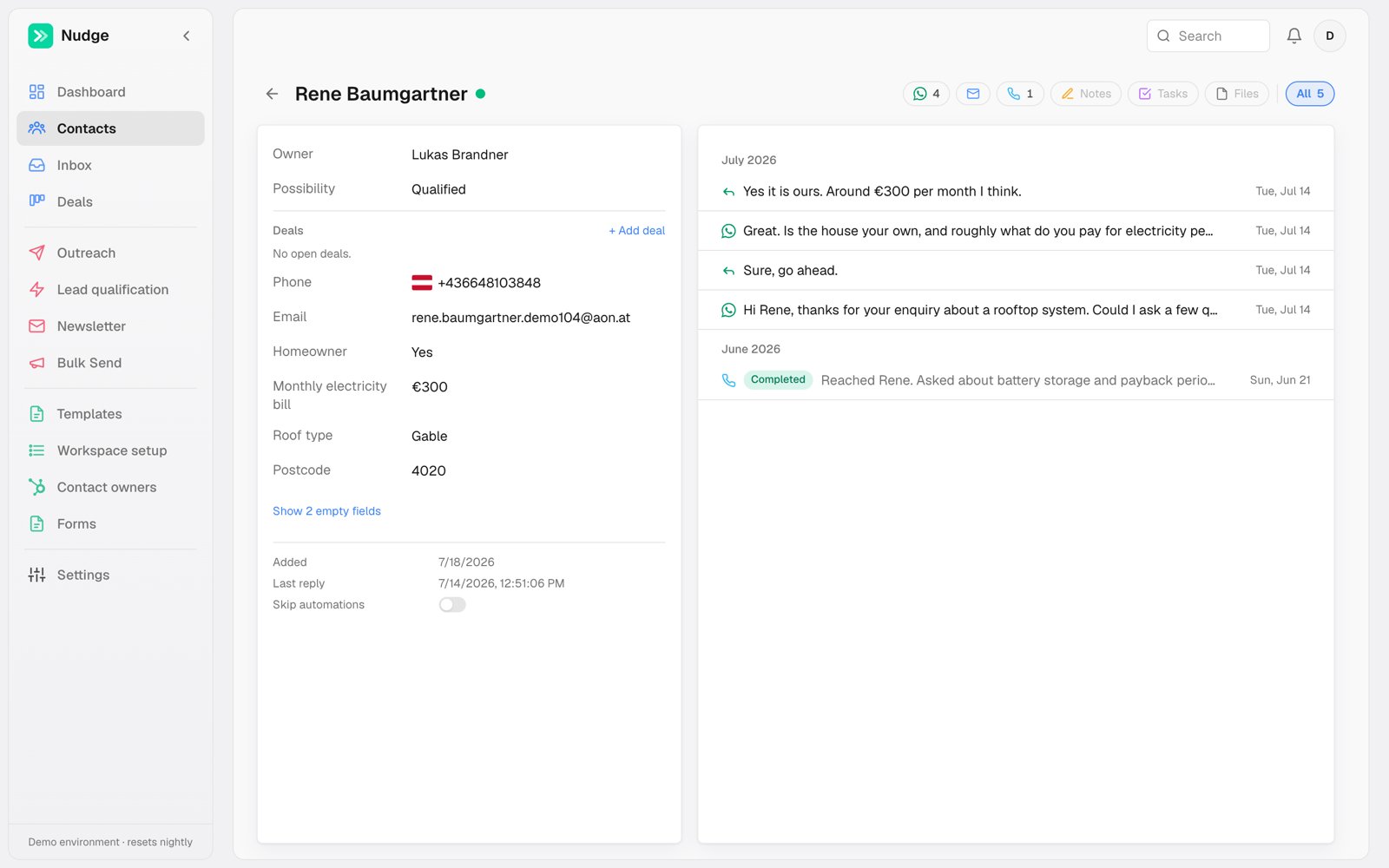
Left: the record
On desktop, the record card shares the top bar’s left inset, matching the conversation list in Inbox. All fields from your fields registry are editable in place: owner, possibility, phone, email and any custom fields like budget or roof type. Changes save as you go; there is no Save button. Empty fields collapse behind a “Show empty fields” link unless Always show is checked for them in Workspace setup. Click Owner, Status or a list field to open its dropdown. Type to find a choice, then select it to save. Press Escape or click outside to close without changing the value. Opening a dropdown keeps the other property rows in place. When editing a text or phone field, press Enter to save and start editing the next visible field. Tab also saves and moves forward; Shift+Tab saves and moves backward. Read-only dates and hidden empty fields are skipped. Escape cancels your current edit. In dropdowns, Enter selects a choice and Tab moves to the next field. Enter still starts a new line in notes and other multiline text. If saving fails, your draft stays open so you can try again. To rename a contact, click First name or Last name in the record. The name in the top bar updates when the change saves. First name and Last name stay visible when empty by default; if your workspace hides them, use Show empty fields to fill them in. Hover a field’s label and a small clock appears. It opens that field’s history: every value it has held, when, and who set it — a person in Nudge, one of your rules, a call’s outcome, or, for a HubSpot field, the person or workflow that changed it in HubSpot. It is the same list HubSpot shows on a record, with the Nudge side filled in, so when a status changed overnight you can see which rule did it and what it was before. Click a phone value to edit its country code and national number. The country picker and number input align at the same height; the field stays in place when editing opens, and the controls wrap when the card is narrow. Next to any phone number there is a ⋯ menu. Copy phone number puts the number on your clipboard. Open in my WhatsApp opens it in WhatsApp Web (or the WhatsApp app on a phone) with your opener already typed, “Hi Mehmet Bey” or “Merhaba Ayşe Hanım” depending on the contact. Open in my WhatsApp with a template lists all your WhatsApp templates instead: pick one and the chat opens with that message filled in for this contact. This uses your own WhatsApp, the one your browser is signed into, so it is the fastest way to send a personal line. Nudge does not send or record these messages; they stay in your WhatsApp. The opener is set once for the workspace under WhatsApp settings. The last two rows of the record say when the contact was added and when they last wrote back. Under the fields, always in view while they scroll, sit the things you decide about contacting them:- Deals shows the contact’s open deals, with an add button.
- Unsubscribe exempts this one contact from every automation. Use it for the lead who asked you to stop, or the edge case you want to handle by hand. You can still write to them yourself. You set it; it is not a note that they requested it.
- Mute does the opposite job: it stops the contact reaching you. Their thread drops out of the Inbox, and you get no notification and no dot when they write. Messages still send and arrive normally — you just have to go and look. Good for the customer who sends five messages a day about nothing urgent.
- No AI calls records that the contact asked not to be called again. The voice agent sets it when they say so on a call; you set it yourself when they told you, on your own call or on WhatsApp. Automated calls stop for them; a person can still call after acknowledging it. Turn it off if they later say calls are fine, and check their status, which may have been closed because of the request.
Unsubscribe and Mute are independent, and it is worth knowing which way each one points. Unsubscribe is about what you send them. Mute is about what they can put in front of you.
Right: the timeline
Everything that happened, newest first: WhatsApp messages both ways, AI call summaries with their outcome, emails, notes, tasks and files. A note shows who wrote it, by name, whether it was written in Nudge or in HubSpot. The channel icons at the top of the card filter it, and the contact’s name sits in the top bar with a purple dot beside it — click the dot to pin this conversation for later, or click the arrow to go back where you came from. Whatever you can do on a channel sits at the right end of that same row of icons: Compose on Email, Place call on Calls, Add note on Notes, Get upload link and Upload on Files. Place call starts an AI call to this contact right now, pre-filled with the owner’s default agent and number. It opens in the bottom-right corner like the send window, and next to it when you have a message open, so you can place a call without losing what you were writing. When something is planned with this person, a line under the top bar says what comes next: a meeting, a call one of your AI agents is about to place, or a task that’s due. A call the contact asked for is marked as theirs, and an overdue task shows in red. Tasks appear here on workspaces that keep their own contacts in Nudge; with HubSpot, tasks stay in HubSpot. The soonest item shows, and the number beside it opens the rest. Click an item to open it: a meeting in the calendar, a call on Calls, a task in Tasks. When nothing is planned, there’s no line at all. The WhatsApp thread and composer stay available even when no sending number is assigned. You can read the history and draft a reply without a warning. If you try to send or confirm a scheduled message, Nudge asks for a sending number and keeps your draft and attachments intact. The + beside the message box opens the full send window. It sits in the bottom-right corner, the way Gmail’s does, so the conversation stays readable while you write. Click its title bar to fold it down out of the way and click again to bring it back; your draft is kept. If it covers something you need to read, drag it by the title bar anywhere on the screen. Folding puts it back in the corner, and unfolding returns it to where you left it. The email and call windows move the same way. Opening a note, a task or a call doesn’t close it. Links in emails and WhatsApp messages open in a new tab, so clicking one never takes you away from a draft or a call. To use a template, click Start from template and type part of its name. Add a variable, an emoji or an image, and the right side shows the message the way this contact will get it. Paste a screenshot into the message box or drop a file anywhere on the window and it is attached straight away; the image button opens the media library inside the same window. A template with several languages gets a picker next to it; the one you leave picked is the one sent. You can change a template’s words before sending, and what you see is what goes out. An edited message is no longer the approved template, though, so an API number stops being offered for it unless the contact has written to you in the last 24 hours. Undo the edit and the API number comes back. Send from lists the numbers that can send it (see Which number sends what) and starts on the number the conversation is already on. In a HubSpot workspace, Log to HubSpot adds a note to the contact with the template, the number and the text; untick it for a send you’d rather keep off the record. Messages typed straight into the chat are never logged that way. Schedule picks a time instead of sending now. Switching to Email shows every email as its own card, newest first — the full subject, who wrote it, the message itself, and a quiet note at the bottom saying whether a sent email has been opened. Long emails are trimmed with a Show more; Reply on any card opens the composer with the subject and sending address already filled in. Calls works the same way: one card per call, with the outcome on top. On the left are the facts: who called whom, how it ended, which rule or person placed it, and what the call collected. On the right is the summary, then Automations, the ones this call set off and what each one booked (a follow-up call, a WhatsApp), then your Notes. The recording sits under both, and Transcript opens everything that was said. Click a rule’s name to open it; Back brings you to the contact again. A call that is booked but hasn’t gone out yet says when it will ring and what booked it, for example Calls today at 7:59 PM · Scheduled by Host answered but unresolved, and Cancel stops it. A cancelled one says when it was due and why it was dropped, such as they called back first. A call where the line opened but nobody spoke (silence, or a call-screening machine) shows as Nobody spoke and counts as a missed call, so the usual retries follow.Reviewing a call
Every call card has a Notes box. Click into it to write what went wrong or what should have happened, and Pass and Miss appear beside the title: pick one, or leave both and it stays a plain comment. It saves as you type, and everyone in the workspace sees the same note. When a call has also been reviewed by AI, that review shows under yours, separately, so the two never overwrite each other.When a message is queued but not yet sent, the timeline shows a real estimated send time that accounts for the sending number’s queue, not a generic countdown.A queued message that never went out stays in the thread, struck through and greyed, labelled with why it was dropped — they replied, no longer qualified, automation edited. It is the record of what automation would have said, and it is never mistaken for something the contact received.