

What shows up
By default a conversation moves to the top when the contact writes to you on WhatsApp or email, or rings one of your numbers. An inbound call previews its summary. If nobody spoke on the call, you get a red handset instead. An admin can change this in Settings → General → Inbox, with one switch each for WhatsApp replies, email replies, inbound calls, and messages and calls you send. Sending is off by default. Most of it is automation, so with it on a busy automation pushes real replies down the list. Only something the contact did can mark a conversation unread; your own sends just move it up.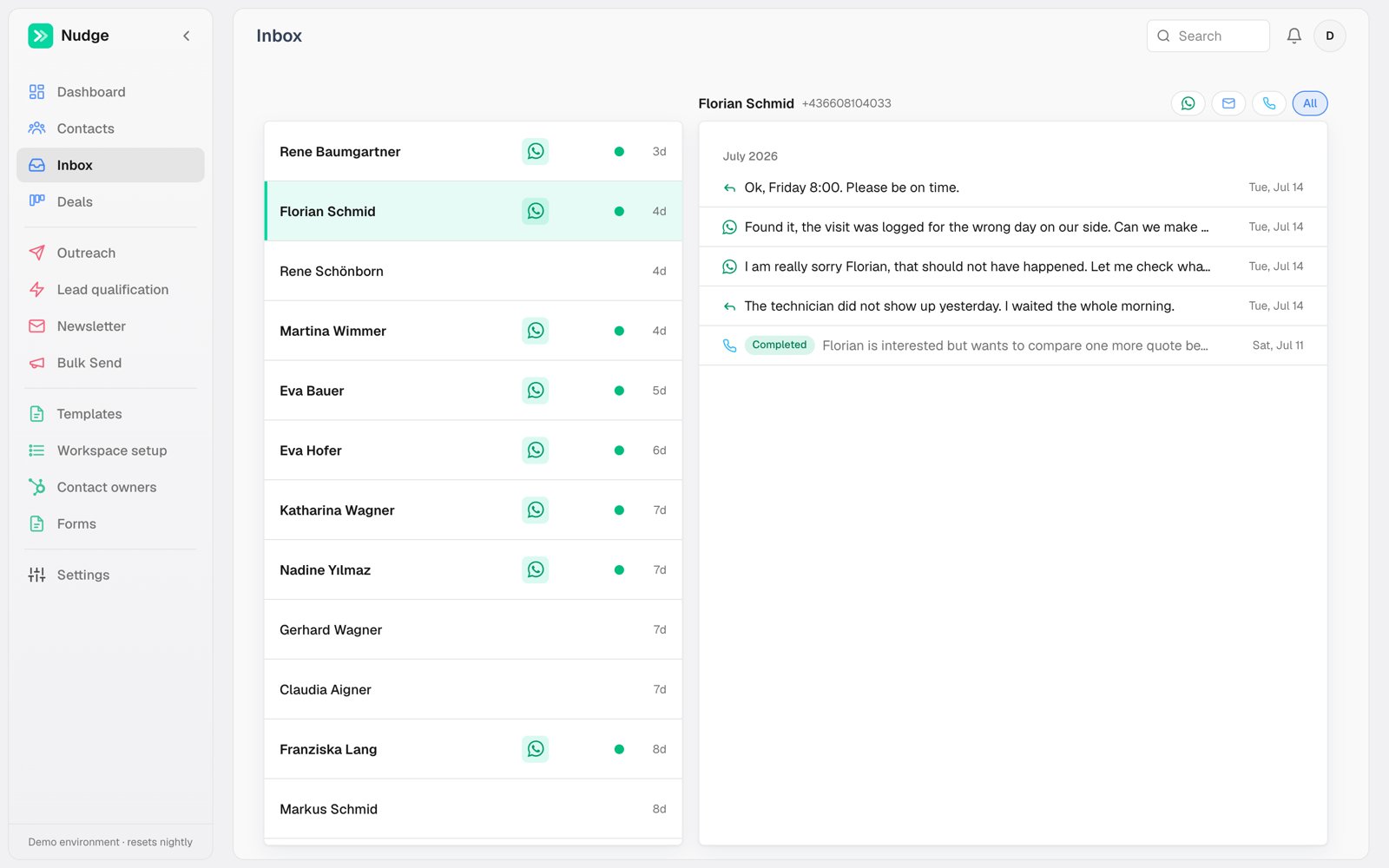
One thread per contact
The icons top right switch channel: the WhatsApp back and forth, emails, AI call summaries with their outcome badge. The Inbox opens on one channel at a time — for the whole history in a single stream, open the contact’s own page. Opening a conversation lands you on whichever channel the latest message came in on, so an email reply opens the email thread rather than an empty WhatsApp tab. The second line of each conversation shows a short message preview. Email previews show readable text; open the conversation to see the full formatted email.Finding a conversation
The chips at the top of the list narrow it. Unread shows only conversations with a reply you haven’t opened (the chip carries the count, up to 99+), Pinned shows what you’ve pinned for later. Nothing lit means you’re seeing everything — click a lit chip again to come back to that. The list has no limit. It loads the newest fifty conversations and fetches more as you scroll down, up to five hundred. Past that, or when a chip, an owner filter or a search leaves only a few matches, Show older conversations at the bottom of the list loads the next batch. So a campaign that brings in hundreds of replies still puts every one of them in front of you, oldest at the bottom. The chips and the owner filter apply to the whole list, not just the part you’ve loaded. If you leave the Inbox in a background tab for five minutes or more, it reloads from the top when you come back. To filter by colleague, open the ⋯ at the end of the row and tick one or more owners; All owners at the top of that list clears it in one go. Clicking the owner name on any row does the same thing in one step — click Aysu on a row and the list shows only Aysu’s conversations, click it again to release. While an owner filter is on, a chip appears in the filter row naming who it holds, so the list never narrows without saying so. Search matches the contact’s name, phone and email — and the name of whoever owns the lead, so typing a colleague’s first name narrows the list to their conversations. Every row shows the owner beside the contact’s name, so you can tell whose lead it is without opening it.Working through several at once
Hover a row and a checkbox appears on its left. Tick one and the filter chips give way to a selection bar: how many you have picked, and what you can do with them. Once anything is ticked the boxes stay visible on every row, so picking a run is not a game of chase. Shift-click picks a run. Tick the first conversation, hold shift, click the last, and everything between comes with it — twenty rows in two clicks. It works on the checkbox or anywhere on the row once something is ticked. Went too far? Shift-click back inside the run and it clears from there down. The box at the left of the bar picks everything currently showing, and Escape drops the selection. Read clears the green dot on everything you picked without opening any of it. This is for the morning where forty replies came in overnight and half of them say “ok, thanks”. To clear the unread mark on everything at once, use the ⋯ button at the end of the filter row. That one ignores your filters completely — it is the whole reason it exists, since ticking rows can only ever reach the conversations currently showing. The menu item is greyed out when nothing is unread. For the scale, look at the Unread chip first: with no owner filter or search on, it counts the same conversations. Mute does in bulk what the switch on a contact’s page does one at a time: those conversations leave the Inbox and stop notifying you. They go without a confirmation step, because nothing is lost — unmute any of them from their contact page. In Contacts they move out of the main list into their own Muted view: click + at the end of the view tabs and pick Muted. A search still finds them.Replying
Type in the thread to answer on WhatsApp from the number the conversation is on — the one the contact last wrote to, or the one that last reached them — or switch to the email composer to answer an email thread on the address it came in on. The first bubble in the thread names its number next to the time (API MY · 06:35), and so does any bubble where the conversation moves to a different number. Your reply leaves from the last number named. Click any bubble (tap it on a phone) to see its number’s name, phone number and full date. A contact who has never written to one of your numbers is answered from their owner’s number. Replies you send by hand are just messages; they do not restart automations, and they skip the sending queue so they go out immediately.
The WhatsApp thread and composer stay available even when no sending number is
assigned. You can read the history and draft a reply without a warning. If you
try to send or confirm a scheduled message, Nudge asks for a sending number and
keeps your draft and attachments intact.
What the contact’s reply DOES do is stop automation: queued automated messages for that contact are cancelled the moment an inbound message arrives, so nobody gets a robot follow-up mid-conversation. An inbound call doesn’t do this yet: the caller shows up in the Inbox, and their queued messages still go out. How many days the pause lasts is a workspace setting that support can change for you, and an individual automation can be set to ignore it when the contact explicitly asked for the thing.
Place call in the thread header starts an AI call without leaving the inbox.